
You tweak your AI agent's greeting on Monday. A small adjustment, nothing dramatic. By Thursday, something's off. Calls aren't handled as they should. The tone feels wrong. Callers are dropping earlier in the conversation.
Was it the greeting you changed? The instructions you updated? That new tool you enabled on Tuesday? You scroll through settings trying to remember. You can't. And neither can your office manager, who made her own changes Wednesday.
Sound familiar? You're not alone. And now, you'll never have to guess again.
The Problem: Changes Without a Trail
Here's the reality of managing AI employees: they get better through tuning. You adjust the greeting for a seasonal promotion. You update call-handling instructions based on patient feedback. You enable a new scheduling tool. You refine the tone.
This is good. This is how your AI employee grows into the role.
But without a record of what changed and when, tuning becomes a liability. Three things go wrong:
1. Mystery performance drops. Call quality dips, but no one knows why. Was it a configuration change? Which one? When? You're stuck guessing or worse, making more changes on top of changes you can't trace.
2. Team coordination breaks down. In multi-location practices, multiple people configure the same AI agent. Your office manager tweaks the personality. Your marketing lead updates the greeting. Your operations director changes the scheduling rules. Nobody tells anyone else. When something breaks, it's a blame game with no evidence.
3. Compliance gaps appear. HIPAA-regulated practices need to demonstrate control over patient-facing systems. If an auditor asks, "What was your AI agent saying to patients on January 15th?" you need an answer. "I don't remember" doesn't cut it.
These aren't hypothetical problems. They're the daily reality of practices that take AI seriously enough to keep tuning it.
The Solution: Full Version History for Every AI Agent
Yobi now automatically tracks every change to your AI agent configuration. Every edit. Every adjustment. Timestamped and saved without you doing a thing.
This isn't version control for engineers. It's a change history built for practice managers who want to know exactly what happened, when it happened, and what their AI employee was configured to do at any point in time.
Not guessing, but knowing.
How It Works
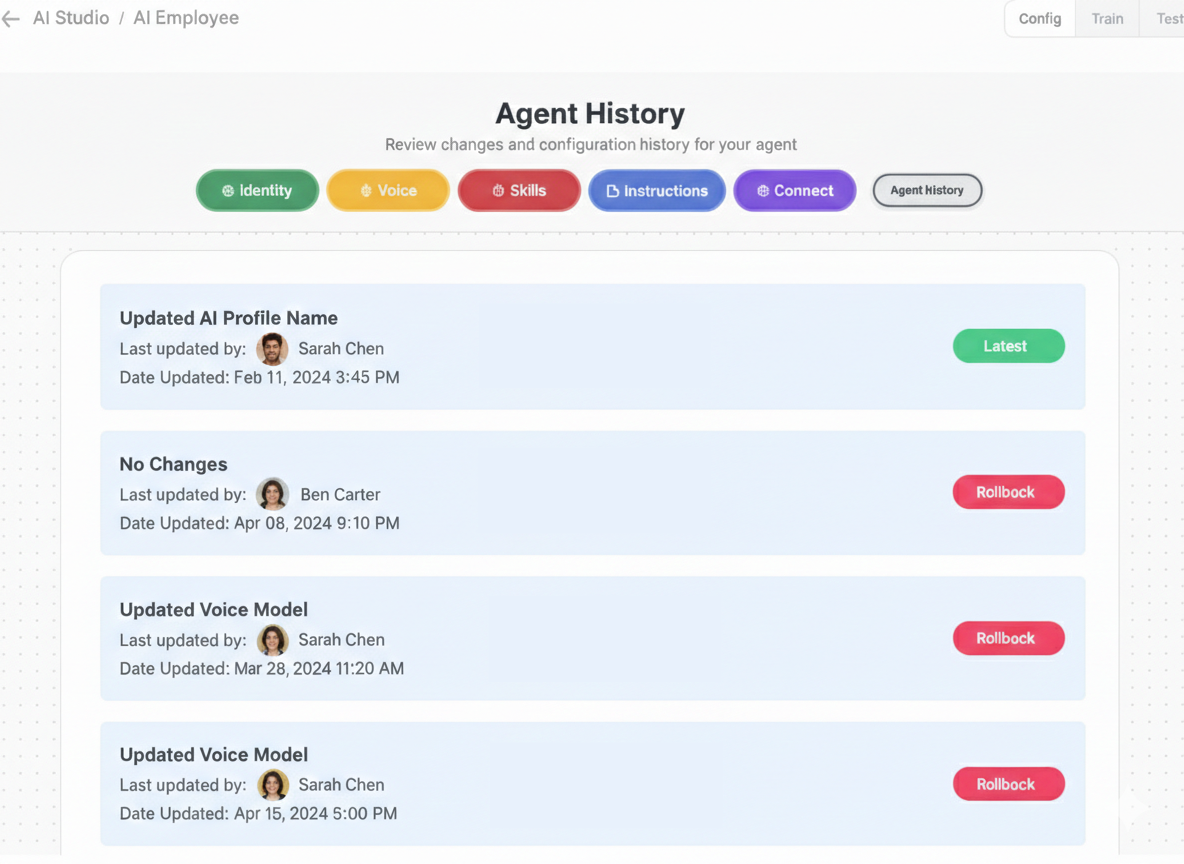
Every time you save a change in AI Studio, Yobi automatically creates a new version. No extra steps. No buttons to click. Just save as you normally would, and the history builds itself.
Here's what you can do with it:
- View your full change timeline — See every version, listed by date and time, with what changed in each one.
- Compare any two versions side by side — Pick Monday's config and Thursday's config. See exactly what's different. Identify the change that caused the issue.
- Label important versions — Name them "Post-training v2" or "Holiday season config" or "Q1 campaign launch" so you can find them instantly.
- Track everything that matters — Personality and tone, greetings, scheduled greetings, voice and text instructions, tool configurations, knowledge base changes, task assignment rules, schedule conditions, and voice settings. If you changed it, it's tracked.
The before/after is immediate. Monday you changed your AI agent's greeting at 2:15 PM and updated the call-handling instructions. Thursday you notice a dip. You open version history, compare Monday's version to last Friday's, and the difference is right there. You revert the instructions, keep the new greeting. Call quality recovers by Friday.
That's not troubleshooting. That's precision.
Real-World Use Cases
1. Diagnosing Performance Changes
Your conversion rate dropped 12% this week. Instead of guessing, open version history. See that Wednesday at 4 PM, someone updated the greeting and changed the escalation instructions. Compare the two versions. Pinpoint the culprit. Fix it with confidence.
2. Team Coordination Across Locations
Your dental group has three locations. Each office manager configures their agent. With version history, everyone can see what changed across the team — no surprises, no conflicting changes, no "I thought you were handling that" conversations.
3. Compliance and Audit Readiness
A compliance officer asks what your AI employee was telling patients last month. You pull up the version from that date. Every greeting, every instruction, every tool configuration is documented automatically. Not a manual log you have to maintain. An automatic record you can trust.
4. Experimenting Safely
You want to try a new tone for your AI agent. It's more casual, more conversational. Change it. Run it for a week. If it works, label it "Conversational tone v1." If it doesn't, you have a clear record of what you tried and what the previous version looked like. Iteration becomes science, not guesswork.
5. Milestone Labeling
End of a training period? Label the version "Post-training v2." Launching a holiday campaign? Save it as "Holiday season config." Starting a new quarter? Mark it. When you need to reference or return to a known-good state, you know exactly where to find it.
Why This Matters
This feature isn't flashy. It won't be the thing that makes you choose Yobi. But it's the thing that makes you stay.
Because the practices that get the most from their AI employees are the ones constantly tuning, adjusting, and improving. Version history turns that process from a leap of faith into a controlled, traceable, repeatable practice.
It means your AI employee doesn't just work. It works in a way you can understand, track, and improve over time.
For HIPAA-regulated practices, it means compliance isn't an afterthought. It's built into how your AI employee operates.
For multi-team practices, it means accountability without micromanagement.
For power users, it means the freedom to experiment without the fear of losing what already works.
Getting Started
Version history is already on. Every Yobi customer has it. Every change you make in AI Studio is automatically tracked. No setup, no configuration, no additional cost.
To access your version history:
- Open AI Studio in your Yobi dashboard
- Select your AI agent
- Navigate to the version history panel
- Browse, compare, and label your versions
That's it. Your AI employee now has a complete record of every change you've ever made.
FAQ
Do I need to turn version history on?
No. It's automatic. Every change you save in AI Studio is versioned from the moment the feature is live. There's nothing to enable and nothing to configure.
What exactly gets tracked?
Everything you can configure about your AI agent: personality and tone, greetings, scheduled greetings, voice and text instructions, tool configurations, knowledge base content, task assignment rules, schedule conditions, and voice settings.
Can I go back to a previous version?
You can view and compare any previous version to understand exactly what changed. Use the side-by-side comparison to identify differences and make targeted adjustments to return to a previous configuration.
Does this cost extra?
No. Version history is included for all Yobi customers at no additional cost. It's available now in AI Studio.
Is the version history HIPAA compliant?
Yes. Yobi is HIPAA compliant, and version history maintains the same security and compliance standards as the rest of the platform. Your configuration history is protected with the same safeguards as all patient-related data.
About Yobi: Yobi is the premier agentic platform with AI employees that work like real team members, not tools you have to manage. Yobi's AI employees have scheduled over 50,000 appointments for 500+ businesses. Dental practices using Yobi see 7% more new customers.