

Imagine it's the Monday after Thanksgiving. You walk into the office and your front desk hands you a list: five patients booked for Thursday and Friday, the two days your practice was closed.
Three Thursday appointments. Two Friday. Kate scheduled them in good faith because nobody told her the office was closed. Now you're making five reschedule calls before the day even starts. Two patients are frustrated. One leaves a 1-star review.
Not because the AI failed. Because it didn't have one piece of information: which days you're closed.
That problem is solved now.
The Problem No One Thinks About Until It Happens
AI scheduling is fast, accurate, and available 24/7. But there's one thing even the best AI employee can't do: guess when your office is closed.
Holidays. Vacations. Training days. Renovation closures. Weather emergencies. Your staff knows about these. Your printed schedule on the breakroom wall knows. But if your AI agent doesn't know, she's booking patients into empty buildings.
And the fallout isn't just a scheduling headache. It's the patient who drove across town only to find a locked door. It's the callback where you have to explain the mistake. It's the trust erosion, the quiet moment where a patient thinks, "Maybe this AI thing doesn't actually work."
For a system built on reliability, one appointment on Christmas can undo months of goodwill.
The Fix: Closed Days Management
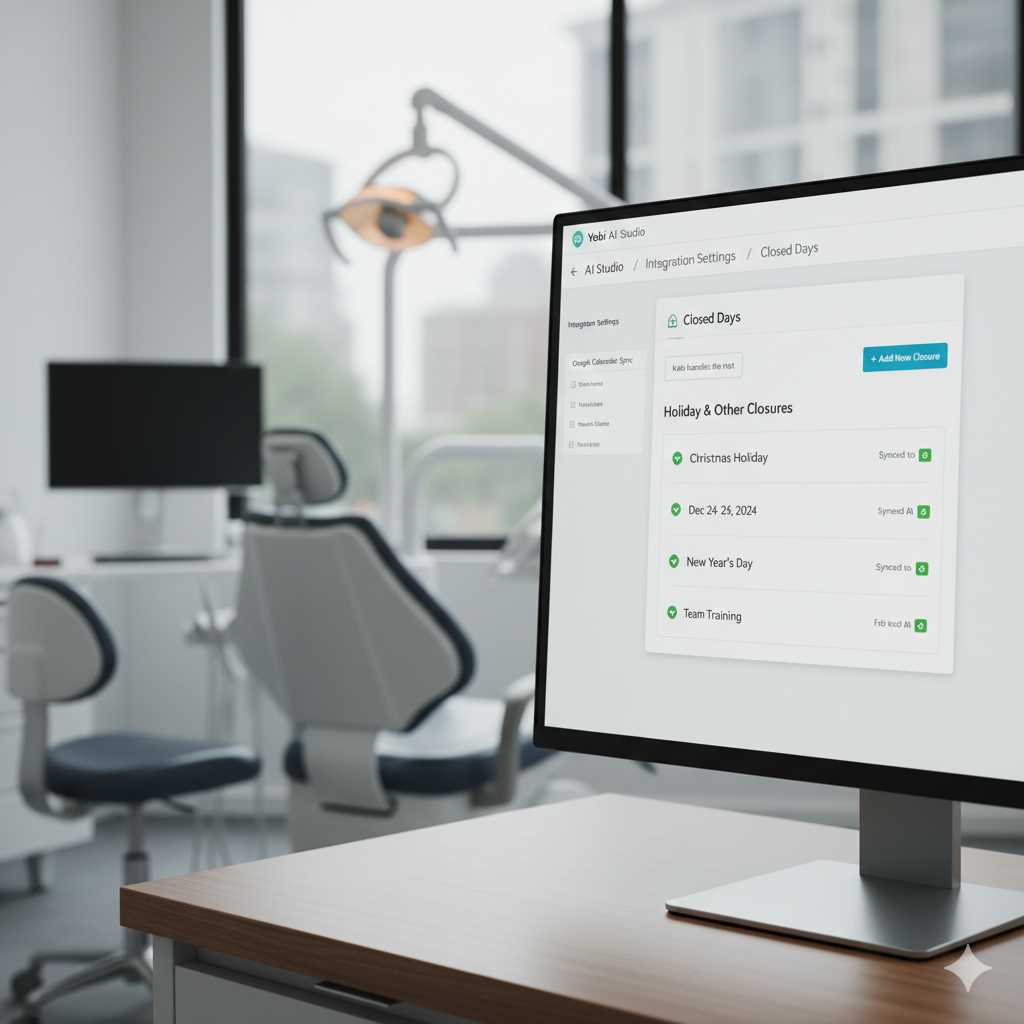
Yobi's Closed Days Management lets you add any closure dates - holidays, vacations, training days, anything directly from your dashboard. Those dates sync to your AI agent automatically. Kate immediately stops booking on them.
No code. No tickets. No workaround. You add the dates, and they're live.
When a caller asks for an appointment on a closed day, Kate handles it like a real team member:
Kate:"Our office is closed on the 25th for the holiday. The next available opening is the 26th at 9 AM. Would you like me to book that for you?"
Professional. Clear. No confusion. The caller gets a better experience than if a human had fumbled through the same explanation.
How It Works
- Open AI Studio in your Yobi dashboard
- Go to Integration Settings → Closed Days
- Add individual dates or date ranges (e.g., December 24–26, or a full vacation week)
- Save. Dates sync to the AI agent automatically
- Kate immediately stops offering those dates to callers
That's it. Setup takes about 30 seconds per date. Past dates auto-clean from the list, so you never have to go back and tidy up old holidays.
Use Cases
National holidays. Christmas, Thanksgiving, Fourth of July, Memorial Day, Labor Day. Add them once at the start of the year and forget about them.
Staff vacations. Your lead hygienist is out for a week in March. Block those dates so Kate doesn't book cleanings nobody can perform.
Office renovations. Closing for three days to install new equipment? Add the range. Callers hear about the closure and get offered the first available day after.
Training days. Whole-team CE courses, compliance training, team retreats, or any day you're not seeing patients.
Weather closures. Ice storm shuts you down for a day. Add it from your phone in 10 seconds. Kate adjusts immediately.
Multi-day closures. Vacation weeks, holiday stretches, extended shutdowns, the date ranges handle them cleanly without adding each day individually.
Why This Matters
This isn't a headline feature. It's not going to appear in a sales demo. But it's exactly the kind of detail that separates an AI employee from a tool that kind of works.
Real employees know when the office is closed. They don't offer Thursday appointments during Thanksgiving week. They don't need to be told twice. They just know because someone told them once, and they remembered.
That's what Closed Days Management gives Kate. One update, permanent awareness, graceful handling. The kind of thing a patient never notices when it works and absolutely notices when it doesn't.
Practices using Yobi see 7% more new customers. That growth is built on trust. And trust is built on hundreds of small moments where the AI gets it right including knowing when you're closed.
Getting Started
Closed Days Management is available now for all Yobi customers at no additional cost.
- Log into your Yobi dashboard
- Open AI Studio → Integration Settings → Closed Days
- Add your upcoming closures
- Kate handles the rest
Already have holidays coming up? Add them now. It takes 30 seconds, and it means zero embarrassing bookings when you come back.
FAQ
Does this cost extra?
No. Closed Days Management is included for all Yobi customers.
Can I add a range of dates, like a full vacation week?
Yes. You can add individual dates or date ranges. A week-long closure is one entry, not five.
What does the caller hear when they ask for a closed day?
Kate tells them directly: "Our office is closed on [date]. The next available opening is [date and time]. Would you like me to book that for you?" No confusion, no dead silence — a clear, professional redirect.
Do I need to remove old dates manually?
No. Past dates auto-clean from the list. You'll only ever see current and upcoming closures.
About Yobi: Yobi is the premier agentic platform with AI employees that work like real team members, not tools you have to manage. Yobi's AI employees have scheduled over 50,000 appointments for 500+ businesses. Dental practices using Yobi see 7% more new customers.