
It is 7:40 pm on a Tuesday. A patient who has been coming to your practice for years calls to book a cleaning. She asks for the hygienist she has seen since her first visit. The call is answered, a cleaning goes on the schedule for Thursday at 10:00 am, and she hangs up happy.
On Thursday she arrives, and someone else is holding her chart.
Nothing was missed. The call was answered and the slot was filled. It was filled with the wrong person.
The problem
Any practice with more than one provider runs on unwritten knowledge about who sees whom. This patient always sees Dr. Martinez. That family follows one hygienist. Your front desk carries all of this in their heads and applies it on every call.
Who patients see is part of why they come back. In Humana research from November 2025, conducted by Opinium Research, 42% of dental insurance decision makers said friendly interactions with dental hygienists contribute to their decision to return (Humana).
An AI agent that answers the phone after hours, or while your team is with the patient in front of them, needs the same knowledge. Without it, the agent does the reasonable thing and offers the first open time, and nobody sees the mismatch until the patient arrives.
This is not a front-desk problem, and it is not the agent being careless. It is one piece of information the agent did not have: who this patient should be seeing.
The fix: Provider Selection
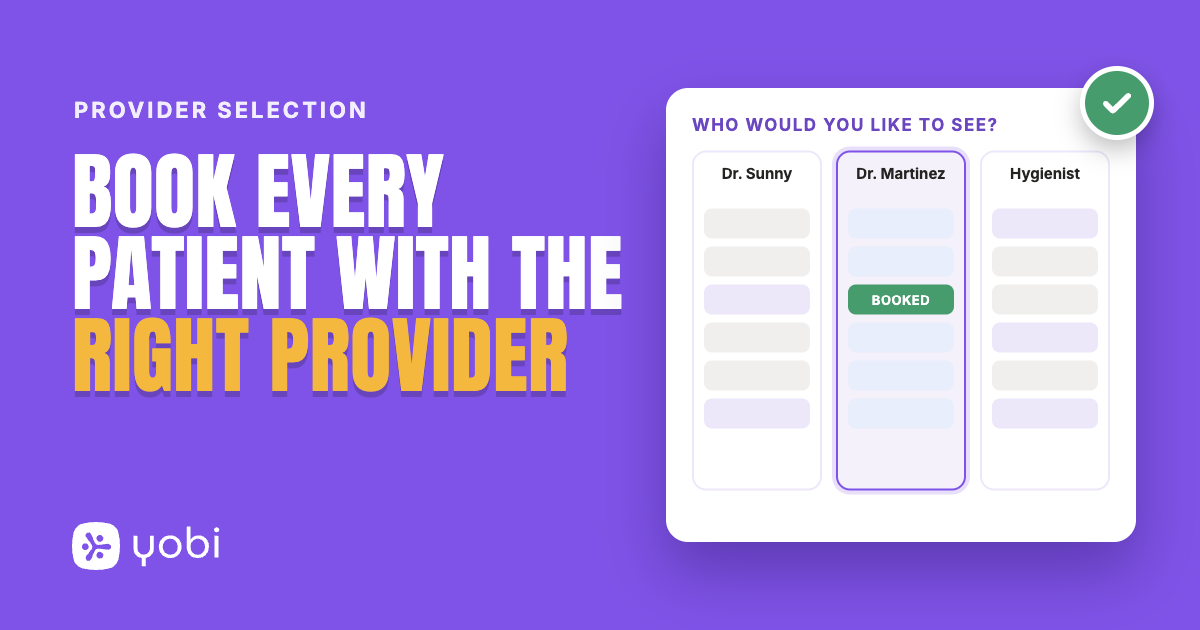
Provider Selection lets your AI agent schedule patients with the right provider, not only at the right time. You choose how it behaves, and you can use one option or several:
- Book a specific provider when a caller asks. A caller names a dentist or hygienist, and your agent looks for openings only on that person's schedule.
- Ask which doctor. For the appointment types you choose, your agent asks the caller which doctor they would like to see before it looks for times. A caller with no preference still gets offered times.
- Keep patients with the provider they usually see. For existing patients, your agent can book with the provider they have seen most often in their recent visits, without asking.
How it works
Provider Selection is set up with the Yobi team, not from a settings screen.
- Tell the Yobi team how you want providers handled: which options you want and which appointment types your agent should ask about.
- The Yobi team configures your agent with the options you chose.
- When your providers or preferences change, tell the Yobi team and we will update it with you.
On the call, it works the way a good front desk works:
- A caller names a provider, and your agent offers only that provider's openings.
- If that provider has no openings, your agent asks whether the caller would like to see times with any provider.
- If the caller asks for someone your agent cannot find among your bookable providers, it says so and offers the providers who are available.
- If the caller has no preference, your agent does not push one. Unless you chose the ask option, it does not bring up providers.
Here is how a call can sound at a fictional practice, Riverside Dental:
Caller: "I need to book an exam this week, and I would like to see Dr. Martinez."
AI agent: "Dr. Martinez does not have any openings this week. Would you like to see times with any of our providers?"
Caller: "I would rather wait. What about next week?"
AI agent: "Dr. Martinez has an opening next Tuesday at 9:00 am, or next Thursday at 2:30 pm. Which works better for you?"
Use cases
1. The patient who wants the right provider by name
A long-time patient asks for their hygienist and gets that person's schedule, not the first gap in anyone's column.
2. The patient who does not remember the name
"I saw the tall doctor last time" is not a name your agent can look up. With the usual-provider option on, your agent looks for times with the provider the patient has seen most often in their recent visits, and the caller never has to come up with a name.
3. Appointment types where the doctor matters
For a routine cleaning, a caller may not mind who they see. For a consultation, they often do. Have your agent ask which doctor only for the appointment types where the answer matters.
Why this matters for your practice
Before: Your agent fills the first open time. The appointment is real, but it is with the wrong provider. The patient finds out at the door.
After: The caller asks for their provider and gets that provider's schedule. The patient who cannot remember a name can be booked with the person they usually see. That is one less thing for your front desk to fix in the morning.
Getting started
Provider Selection is available now for every Yobi customer on the AI Integrated plan, which includes the NexHealth integration. No upgrade required. No additional cost.
A few things to know before you ask for it:
- It works on phone calls, not text or chat conversations.
- Your agent only recognizes providers in your practice management system (PMS) who have bookable hours. If a caller asks for a team member who has none, your agent says it cannot find that provider and offers the ones it can book. If a provider does not perform the appointment type, your agent says so and asks whether the caller would like times with a provider who does.
- When a caller is rescheduling an existing appointment, they cannot pick a provider by name.
- Your other scheduling rules still apply, including closed days and blocked times on a provider's schedule.
If you are already a Yobi customer, Request Provider Selection: message Yobi support from your Yobi inbox with how you want providers handled, and we will set it up with you.
If you are not using Yobi yet, find out how an AI receptionist handles your schedule the way your front desk would. See It in a Demo or call Kate at 609-507-2178.
FAQ
Can a caller still book if the provider they ask for has no openings?
Yes. Your agent tells the caller and asks whether they would like to see times with any provider.
Does my agent read the provider list to every caller?
No. Unless you chose the ask option for that appointment type, your agent does not bring up providers. It lists who is available only if a caller asks for someone it cannot find.
Does this work over text or chat?
No. Provider Selection works on phone calls only.
Does this cost extra?
No. It is included in the AI Integrated plan.