
Your AI employee just learned a new skill. And it might be the most valuable one yet.
Until now, Yobi's AI agents have been inbound machines answering every call, booking every appointment, handling every inquiry, 24/7. That alone has been worth thousands in recovered revenue for the practices using them.
But here's what your front desk has been doing between those incoming calls: dialing out. Appointment reminders. No-show follow-ups. Reactivation calls to patients who haven't visited in months. Confirmation calls for tomorrow's schedule.
Important work. Revenue-protecting work. Work that never gets finished because the phone rings and an incoming patient takes priority.
Now Yobi AI agents handle both sides.
The Cost of Calls You Don't Make
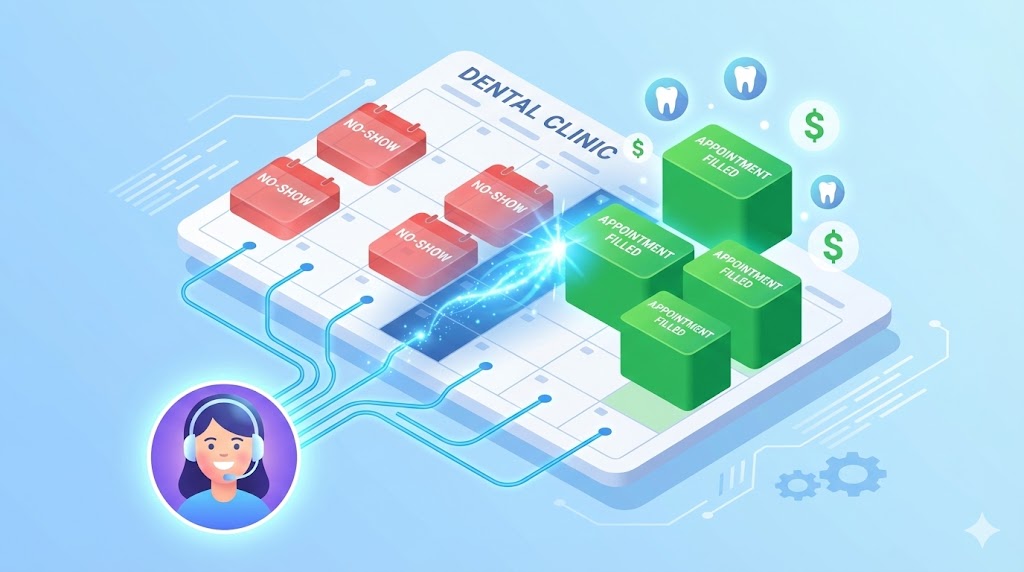
Let's talk numbers. The average dental practice loses $200 per no-show. If you have 20 no-shows a month, and many practices do, that's $4,000 walking out the door every month. $48,000 a year.
Phone-based reminders are the single most effective way to reduce no-shows. More effective than texts. More effective than emails. A real conversation where the patient confirms, reschedules, or asks a quick question, that's what keeps chairs filled.
But here's the reality: your front desk has 40 patients to call about tomorrow's schedule. They get through 12 before walk-ins, incoming calls, and insurance questions take over. The other 28 don't get a reminder. Six of them no-show.
That math breaks down quickly. And it's not your staff's fault because they're doing five jobs at once. They just don't have the capacity for proactive outreach.
Until now.
How Outbound AI Calling Works
Outbound calling turns Yobi AI agents from reactive assistants into proactive team members. AI Kate, the dental receptionist, for example makes calls on your behalf. These can be appointment reminders, follow-ups, reactivation outreach, confirmations all while following your instructions and reporting back on every outcome.
Setting it up
- Open AI Studio in your Yobi dashboard
- Enable outbound calling on your agent
- Configure calling hours (so patients aren't called at 3 AM)
- Set retry logic (how many attempts, how long between them)
- Schedule individual calls or batches
That's it. Your AI agent starts calling on your schedule, following your scripts, and handling conversations naturally.
What happens on the call
Yobi AI agents don't read a robotic script. Theyhave a real conversation:
Appointment reminder:
"Hi, this is Kate calling from ProDental. I'm reaching out to remind you about your cleaning appointment tomorrow at 2 PM with Dr. Sunny. Would you like to confirm, or would you prefer to reschedule?"
Patient reactivation:
"Hi, this is Kate from ProDental. We noticed it's been a while since your last visit, and we wanted to check in. Would you like to schedule a cleaning? We have openings this week."
Post-procedure follow-up:
"Hi, this is Kate calling from ProDental. Dr. Sunny wanted me to check in after your procedure yesterday. How are you feeling? Is there anything we can help with?"
If she reaches voicemail, she leaves a message. If the patient picks up, she has a full conversation while answering questions, booking, rescheduling, confirming. Whatever you've configured.
Four Use Cases That Pay for Themselves
1. Appointment Reminders
The bread and butter. Kate calls every patient on tomorrow's schedule, confirms their appointment, and reschedules anyone who can't make it. No manual effort. No missed reminders. No $200 no-shows.
The math: If outbound reminders reduce your no-show rate by even 30% — which is conservative for phone-based reminders — a practice with 20 monthly no-shows saves $1,200/month. That's $14,400 a year in recovered revenue.
2. Patient Reactivation
Every dental practice has a list of patients who haven't visited in 6, 12, or 18 months. That list is money sitting on the table. But who has time to call 200 dormant patients?
Kate does. She works through the list methodically, calling during your configured hours, retrying patients who don't answer, and booking anyone who's ready to come back.
Reactivation campaigns typically see 15–25% re-engagement rates. On a list of 200 patients, that's 30–50 patients returning to your practice without a dollar spent on ads.
3. Post-Procedure Follow-Ups
Following up after a procedure shows patients you care. It catches complications early. It builds loyalty. And almost no practice does it consistently because the day after a complex procedure, your team is already booked with the next patient.
Kate calls automatically. The patient feels cared for. Your practice looks exceptional. And if there's a concern, Kate flags it for your team.
4. Confirmation Calls
Different from reminders, confirmations go out 24–48 hours ahead and ask for an explicit yes or no. Patients who can't make it get rescheduled on the spot. Your schedule for tomorrow is locked in and accurate before you leave the office today.
Why This Matters for Your Practice
Revenue protection
Every no-show that turns into a confirmed appointment is $200 saved. Every reactivated patient is hundreds more in treatment value over the next year. Outbound calling doesn't just reduce costs, it actively generates revenue.
Capacity without headcount
Your front desk is already maxed out. Hiring another person to make outbound calls costs $35,000–$45,000 a year. Kate does it as part of her existing role at no additional cost, no additional training, no additional turnover.
Consistency
Kate never forgets to call. She never gets too busy. She calls every patient, every time, at the right time. The kind of consistency that's humanly impossible with a team handling five other priorities.
The complete communication loop
Yobi is now the only agentic platform that handles both inbound AND outbound calling from the same AI employee. One agent, one configuration, one conversation history. Kate knows the patient from their inbound call last week when she calls them for a reminder today. That context makes every conversation better.
Calling Hours and Controls
We built this with common sense in mind:
- Set allowed calling hours per day of the week — no 3 AM calls
- Configure timezone to match your patient base
- Set maximum retry attempts — try twice, then move on
- Batch cancel scheduled calls if plans change (snow day, schedule shift)
- Manage everything from the dashboard — see what's scheduled, what's completed, what needs attention
Your patients get calls at reasonable times. Your team stays in control.
Getting Started
Outbound AI Calling is available now for all Yobi customers. No upgrade required. No additional cost.
- Log into your Yobi dashboard
- Open AI Studio and select your agent
- Enable outbound calling
- Configure your calling hours and retry settings
- Schedule your first batch of calls
Kate's been answering your phones. Now let her pick one up.
FAQ
Does this cost extra?
No. Outbound calling is included in your Yobi plan.
Can I control when Kate calls?
Absolutely. You set the allowed calling hours per day of the week, the timezone, and the retry logic. Kate only calls within your configured windows.
What if the patient doesn't pick up?
Kate can leave a voicemail with the message you've configured. She'll also retry based on your retry settings — for example, try again in 4 hours, then once more the next morning.
Can I cancel scheduled calls?
Yes. You can cancel individual calls or batch cancel from the dashboard at any time.
Does Kate know the patient's history?
Yes. If the patient has interacted with your Yobi agents before, Kate has that context. She knows their name, their upcoming appointment, and their history — making every outbound call feel personal, not robotic.