
Date: February 23, 2026
It's 7 PM on a Tuesday. A patient calls your dental practice. Your AI agent picks up and says:
"Good morning! Thanks for calling Yobi Smiles. How can I help you?"
The patient pauses. It's not morning. It hasn't been morning for eight hours.
That single word — "morning" — just told the caller everything they needed to know. They're not talking to someone who cares. They're talking to a script. And scripts don't build trust.
The Problem: Generic Greetings, Generic Experience
Most AI phone systems use a single greeting. One script. One tone. One set of instructions. Whether it's Monday at 9 AM, Saturday at midnight, or Christmas afternoon — the caller hears the same thing.
And callers notice.
When someone calls your practice at 7 PM and hears "Good morning," a small crack forms in the experience. It's not a catastrophic failure. The appointment might still get booked. But trust took a hit. The caller's subconscious logged something: this isn't real. This is automated. This doesn't know me.
That matters, because the difference between an AI employee and a bot is context. Real employees know what time it is. They know it's a holiday. They adjust how they talk based on when you call. They say "Good evening" after 5 PM, not because someone programmed it, but because it's the right thing to say.
Your AI employee should do the same.
The Solution: Scheduled Greetings and Conditional Agent Behavior
Yobi's AI agents including Kate, who has already scheduled 50,000+ appointments across 500+ businesses, can now adapt their behavior based on time of day, day of week, specific dates, and date ranges.
Not just greetings. Entire behavior sets. Different instructions. Different routing. Different personalities. All based on when the call happens.
Before: A patient calls your practice at 7 PM on a Tuesday. Kate answers:
"Good morning! Thanks for calling Yobi Smiles. How can I help you?"
The patient notices. It feels off. A small crack in trust.
After: Kate answers:
"Good evening! Thanks for calling Yobi Smiles. Our office is closed for the day, but I can absolutely help you schedule an appointment. What works best for you?"
The patient relaxes. This feels like talking to someone who gets it.
That shift — from generic to context-aware — is the difference between a script and an employee.
How It Works
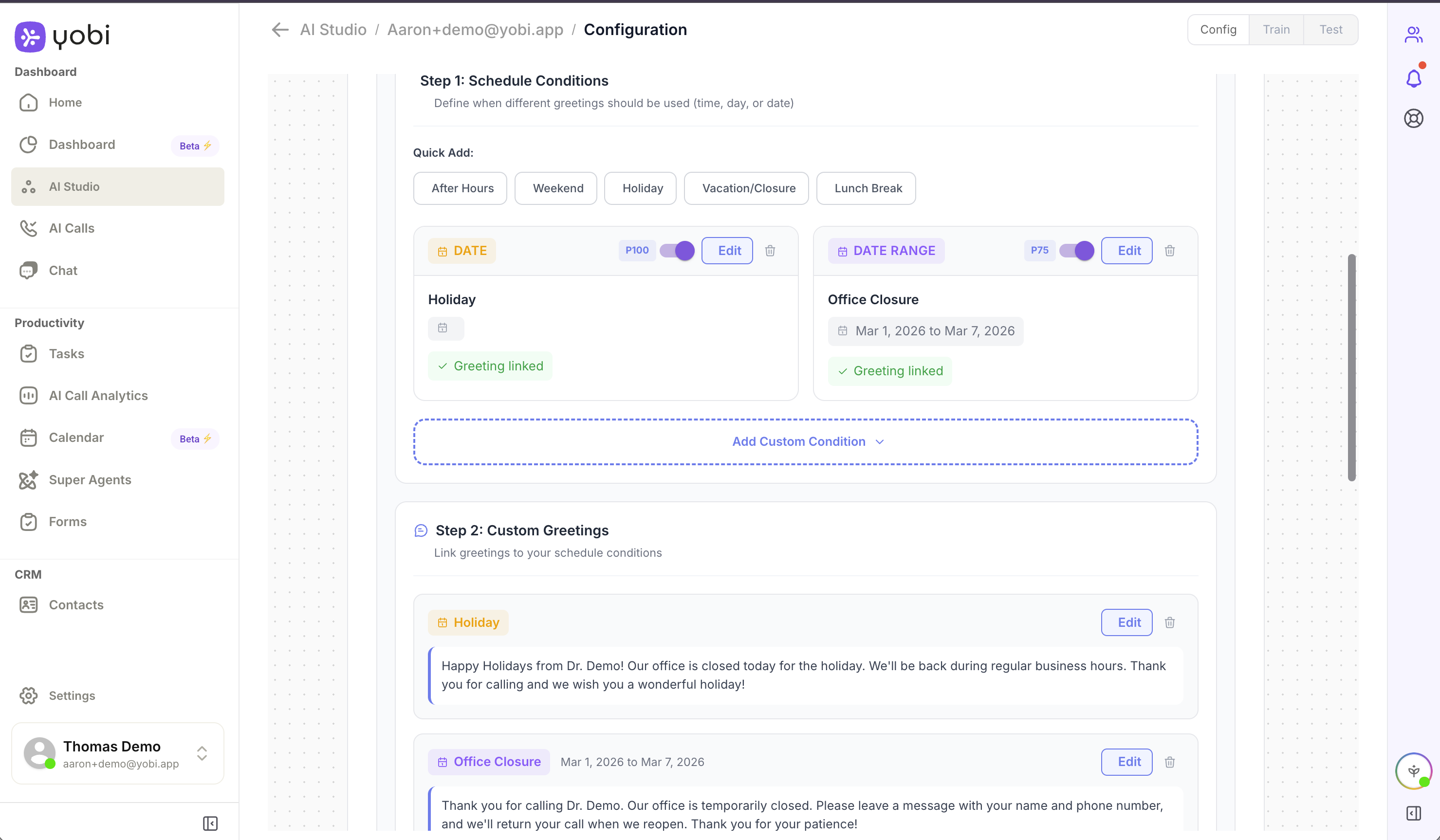
Setting up scheduled greetings takes less than a minute:
- Open AI Studio in your Yobi dashboard
- Select your AI agent
- Navigate to Voice Settings
- Click Add Schedule Condition
- Choose your time trigger: time of day, day of week, specific date, or date range
- Assign the greeting, instructions, and actions for that condition
- Set the priority level (higher priority conditions override lower ones)
- Save
That's it. The next call that matches your condition gets the right greeting, the right instructions, and the right behavior — automatically.
Use Cases: Five Ways to Make Your AI Employee Smarter
1. Time-of-Day Greetings
The simplest and most impactful change. Set three greetings — morning, afternoon, and evening — and every caller hears the right one.
2. Business Hours vs. After-Hours Behavior
During business hours, Kate can transfer urgent calls to your team, check real-time availability, and offer same-day appointments. After hours, she shifts to a different mode: booking for the next available day, collecting callback information, and letting callers know when the office reopens.
3. Holiday Messaging
Christmas Day. Thanksgiving. Your practice's annual closure week. Kate acknowledges the holiday naturally.
4. Seasonal Promotions
Running a back-to-school cleaning special in August? A holiday whitening promotion in December? Set date ranges and Kate weaves the promotion into her greeting naturally.
5. Day-of-Week Personality
Kate can adjust: "Happy Friday from Riverside Dental! Dr. Martinez is in today and we have a few openings this afternoon."
Why This Matters
Context builds trust. Trust drives conversion.
Practices using Yobi already see 7% more new customers compared to those that don't. Features like scheduled greetings are a key reason why — they close the gap between "talking to AI" and "talking to someone who works here."
Getting Started
Scheduled Greetings and Conditional Agent Behavior is available now for all Yobi users. No upgrade required. No additional cost.
If you're already a Yobi customer:
Log in to your dashboard at app.yobi.ai, open AI Studio, and set up your first scheduled greeting.
If you're not using Yobi yet:
See what context-aware AI employees can do for your practice. Book a demo or call Kate directly at (609) 507-2178.
FAQ
How many schedule conditions can I create?
There's no hard limit. Create as many conditions as your practice needs. Use priority levels to control which condition takes effect when multiple conditions overlap.
What happens if no schedule condition matches?
Your agent uses its default greeting and instructions — the same behavior you've always had. Schedule conditions are additive.
Can I set different behavior for specific dates, like holidays?
Yes. You can target specific dates, days of the week, time ranges, or date ranges. Combine them for precise control.
Does this affect just greetings, or can I change other behavior too?
Everything. Greetings, instructions, call routing, actions, and tone. You're changing how she operates based on when the call happens.
Is there any additional cost?
No. Scheduled Greetings is included for all Yobi users at no extra charge.