
It is 9:15 am on a Tuesday. A patient calls to move Thursday's cleaning to the following week. The call is answered, a new time goes on the schedule, and she hangs up happy.
On Thursday of the following week she arrives for a 60-minute cleaning that is now booked as a 30-minute appointment, in the doctor's column instead of hygiene, under a type nobody at the practice would have chosen. Nothing was cancelled. Nothing was lost. The appointment simply came back as something else.
The problem is not that it moved. It is what it came back as.
Rescheduling looks like the simplest thing the front desk does. A patient wants a different day, so the appointment goes on a different day. In a practice management system it is not simple at all, because an appointment is not a time. It is a type, a length, a provider, and a column on your schedule, and every one of those can quietly change when it moves.
That is why so many dental appointment scheduling errors start with a reschedule rather than a new booking. Four things go wrong, and they all go wrong in the same direction.
The type changes, because the patient said "my checkup" and the checkup that got booked was a limited exam. The length changes with it, because the replacement type is a 30-minute appointment and the original was an hour. The column changes, because the replacement type's availability puts the patient in the doctor's chair instead of the hygienist's. And occasionally the age group changes, because a child ends up in an adult slot that happened to be open.
None of this is a front-desk failure. Every one of these is the system taking a patient's description of their appointment and treating it as the appointment itself. The words a patient uses on the phone are not what is written in your schedule, and they never have been.
The fix: Improved Rescheduling
Your AI agent no longer books a new appointment from what it heard on the call. It opens the existing appointment in your practice management system first, reads what is actually on it, and moves that appointment.
The difference sounds small. In practice it is the difference between a reschedule and a rewrite.
What your AI agent checks before it moves anything
All of this happens by default. There is nothing to configure.
It keeps the appointment's original type
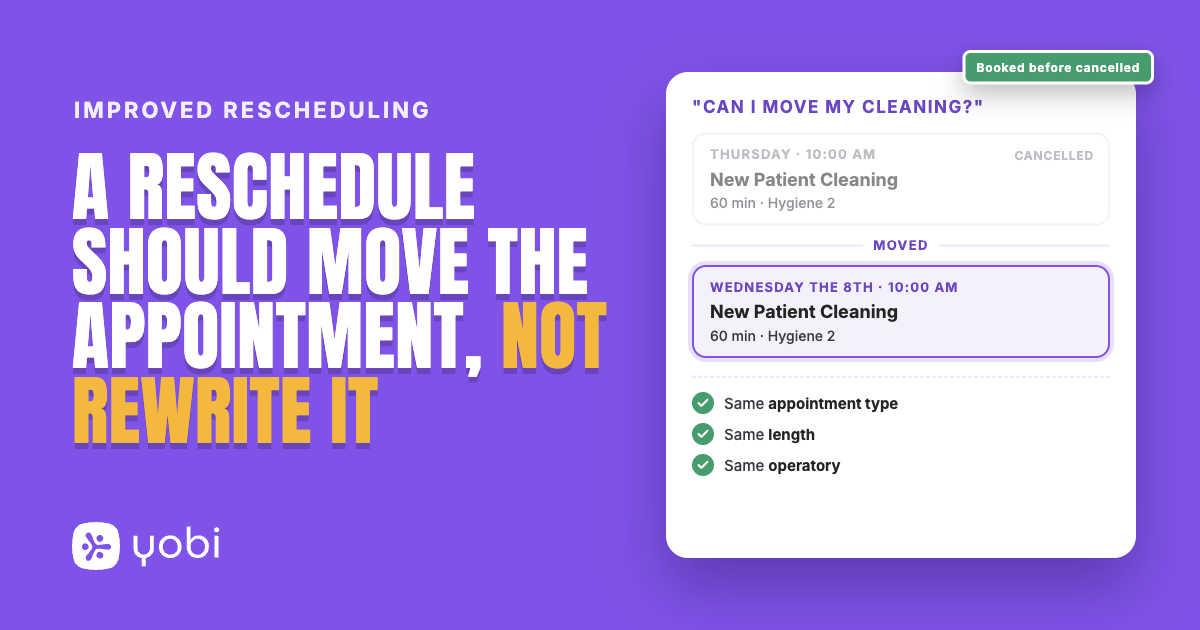
If the appointment on your schedule is a new patient cleaning, it comes back as a new patient cleaning, whether the patient called it a checkup, a cleaning, or "my thing on Thursday". The type your practice put on the appointment wins over the words the caller used to describe it.
Because the appointment keeps its type, it keeps that type's length. An hour-long appointment is rebooked as an hour.
It keeps hand-booked appointments in their own operatory
Some appointments on your schedule were built by your team, by hand, as a type your agent has never been given. A case presentation, a consult a doctor set up personally, something specific to how your practice runs.
What happens to those depends on how your agent is set up. If your agent is limited to scheduling certain kinds of appointment, it will not touch one it does not recognise, and it leaves it for your team. If it is not limited that way, it moves the appointment and pins it to its original operatory, the chair and column it already occupies. That stops the most annoying version of this problem: a hygiene appointment that reappears in the doctor's column because a substitute type's availability put it there.
It will not move a child into an adult slot, when your type names say so
If your appointment types are named with an age range, for example "Prophy ages 3-12" or "Recall ages 13+", your agent checks the patient's age against the type before it books, and refuses a mismatch rather than taking the opening that happens to be free.
This one depends on how your types are named. If your age-specific types carry the range in the name, the check works.
It books the new time before it cancels the old one
The new appointment is made first. The original is cancelled only once the replacement is confirmed. A patient is never left holding nothing because a slot disappeared halfway through the call.
And when it is not sure, it does not guess
This is the part that matters most, and it is the part most automation leaves out.
When your agent cannot move an appointment safely, it stops. The original appointment stays exactly where it is, untouched, at its original time. Your agent tells the caller the office will take it from here, and the request goes to your team to finish.
That happens when the appointment was booked by your staff as a type your agent is not set up to schedule, when the patient's description does not match anything your agent can book, when the requested day is one your practice is closed, and when the patient's age does not fit the appointment type. In every one of those cases, the honest answer is that a person should look at it.
A few limits worth knowing. Your agent moves an appointment; it does not change what the appointment is. Turning a cleaning into a crown prep is a different appointment, and that stays with your front desk. An appointment your team stretched beyond its type's standard length comes back at the standard length, so anything you have hand-sized is still worth a look. And if the appointment cannot be read from your practice management system at that moment, your agent falls back to the ordinary booking path rather than pretending it knows what was there.
A Tuesday morning, start to finish
Riverside Dental has a patient booked Thursday at 10:00 am for a new patient cleaning, an hour in the hygiene column.
Patient: Hi, I need to move my cleaning on Thursday. Can I do the week after?
Agent: Of course. I have your Thursday appointment here. Let me find you a time the following week.
Agent: I can do Wednesday the 8th at 10:00 am, or Thursday the 9th at 2:00 pm.
Patient: Wednesday works.
Agent: Done. You are booked for Wednesday the 8th at 10:00 am, and I have cancelled the Thursday appointment.
What landed on the schedule is the same appointment: still a new patient cleaning, still an hour. Not a limited exam, and not half the time the patient needs.
Riverside Dental is a fictional practice used for illustration.
Why this matters for your practice
Before: a reschedule is a small act of data entry that nobody audits. The appointment moves, the schedule looks full, and the mistake surfaces on the day, when a patient is sitting in the wrong chair and somebody has to fix it in front of them.
After: appointments that move keep their type and the time they need, and the ones that cannot move safely stay put and come to your team instead of landing somewhere wrong.
Getting started
There is nothing to switch on. This is how rescheduling works now for practices on the AI Integrated plan with their practice management system connected through NexHealth.
If you are already a Yobi customer, open your Dashboard and look at the Rescheduled To column to see appointments your agent has moved. Log in to dashboard
If you are not using Yobi yet, see it handle a reschedule on your own schedule. Book a Demo or call Kate at 609-507-2178.
FAQ
Do I need to turn this on?
No. It is how rescheduling works for practices on the AI Integrated plan with the practice management system connected. There is no setting to change and no additional cost.
What happens if my agent cannot reschedule an appointment?
It leaves the original appointment exactly where it is and hands the request to your team. It does not cancel the appointment, and it does not book a replacement it is unsure about.
Can my agent change a cleaning into a crown prep?
No. It moves an appointment; it does not change what the appointment is. A real change of treatment goes through your front desk.
Will a patient ever be left without an appointment?
No. The new time is booked before the old appointment is cancelled, so there is never a moment where the patient is holding nothing.
Does this work with my practice management system?
Yes. For practices on the AI Integrated plan connected through NexHealth, which covers Dentrix, Eaglesoft, Open Dental and Curve Dental.