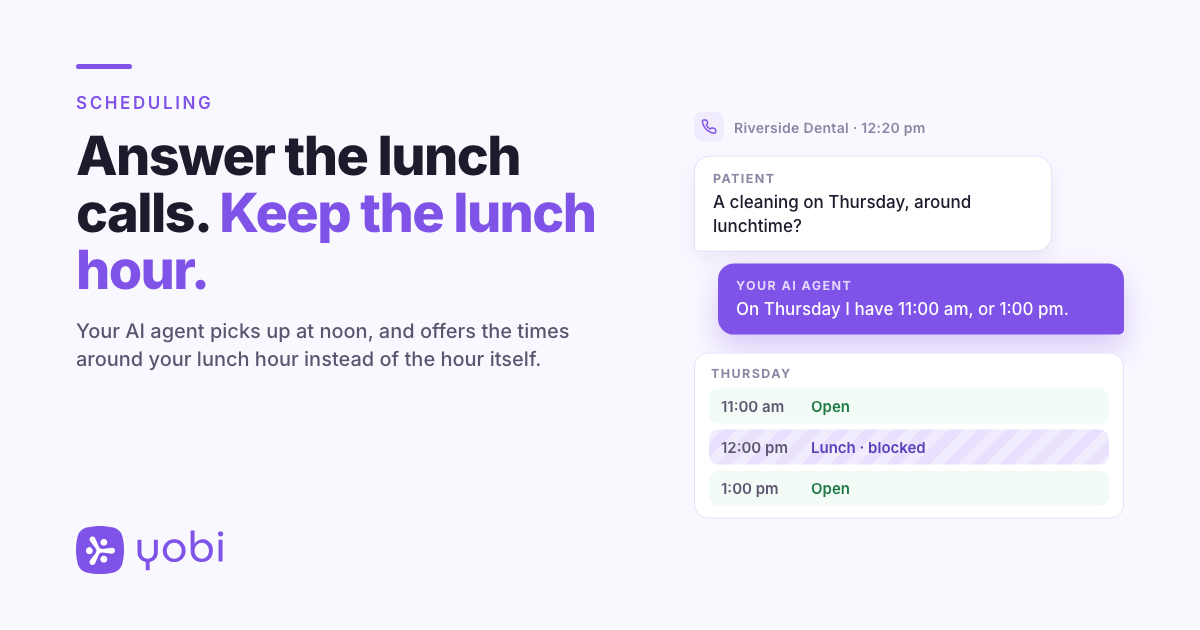
It is 12:20 pm on a Tuesday at Riverside Dental. The front desk has stepped out to eat, and the phone rings. A patient on her own lunch break wants a cleaning on Thursday, "around lunchtime if you have it, that's when I can get away."
Your AI receptionist picks up. That is the point of having one. The question is what it offers her.
Lunch is when patients call, and when your team is out
Many practices close the front desk for an hour in the middle of the day, and for many patients that same hour is the only time they can make a personal call. So the lunch hour can be busy on the phone and empty at the desk, and an AI receptionist that answers those calls is doing the job you hired it for.
What it says at lunch is one half of the problem, and Scheduled Instructions already covers it. The other half is the schedule. A lunch hour is a time your team is not there to see patients, and in some practice management systems a lunch block can still be booked over. Open Dental's own manual notes that a blockout can either allow appointments over it or prevent them.
Answering at lunch is the job. Booking into lunch is not.
The fix: Recurring Blocked Times
Recurring Blocked Times tell your AI agent which hours to keep out of the appointments it offers: a lunch hour from 12:00 to 1:00 pm on weekdays, a team meeting every Wednesday morning, a shorter lunch on Fridays.
When a caller asks for an appointment, your AI agent leaves out openings that overlap a blocked time. That includes a visit that would start before lunch and run into it, so a one-hour cleaning is not offered at 11:30 am when lunch starts at noon. It offers the times before and after instead.
Blocked times apply to your whole practice location: every chair, and every AI agent that books for that location. Once the Yobi team adds or removes one, the change applies from the next call.
How it works
The Yobi team sets up your blocked times for you. You tell us three things for each one:
- A name, such as "Lunch" or "Team meeting".
- The days it repeats, any combination from Monday to Sunday.
- The start and end time, in your practice's local time.
If lunch is at a different time on some days, that is a second blocked time with its own days. To change or remove one, message Yobi support the same way.
Where it helps
1. The lunch hour
Block 12:00 to 1:00 pm on the days you close for lunch. Callers who ask for midday hear the times on either side of it.
2. The standing team meeting
If the whole practice meets every Wednesday from 8:00 to 9:00 am, block it once. On Wednesdays, your AI agent offers times that do not run into the meeting.
3. A different lunch on Fridays
Some practices take a shorter lunch at the end of the week, or eat earlier on the day they close early. Set Monday to Thursday as one blocked time and Friday as another.
A Tuesday lunch call, start to finish
Riverside Dental blocks 12:00 to 1:00 pm, Monday to Friday. The front desk is out, and a patient calls about a cleaning.
Agent: Thank you for calling Riverside Dental. How can I help?
Patient: Hi, I'd like to book a cleaning on Thursday. Around lunchtime, if you have anything.
Agent: I would be glad to help. Can I get your name?
Patient: It's Jordan.
Agent: Thanks, Jordan. On Thursday I have 11:00 am, or 1:00 pm. Would either of those work?
Patient: 1:00 works.
Agent: To make sure I have the right record, can you confirm your date of birth?
Patient: Sure. (Jordan gives it.)
Agent: Thank you. You are booked for Thursday at 1:00 pm.
Jordan got a time that fits a lunch break. Your AI agent never mentioned lunch: it did not offer a time inside it.
Riverside Dental and Jordan are fictional, used for illustration.
Why this matters for your practice
Before: your lunch hour is protected when the person answering the phone remembers it. If the calendar shows noon as open, noon can be offered.
After: your AI agent answers the lunch-hour call and offers the times around your lunch hour, without anyone having to remember it.
What to know before you set it up
- It applies to phone calls your AI agent answers.
- It works for practices whose AI agent books into their practice management system through NexHealth.
- It shapes what your AI agent offers. Blocked times are a Yobi setting. They do not change the calendar in your practice management system, so your team can still book any time there.
- In a few cases, a blocked time can still be offered, for example when a caller asks for any time over the next few weeks and the coming week has no other openings.
- Callers are not told why a time is unavailable. Your AI agent does not say "we are at lunch"; it offers other times. If you want callers who ring during lunch to hear that the office is at lunch, add that with Scheduled Instructions.
Getting started
Recurring Blocked Times are included in the AI Integrated plan, at no additional cost.
If you are already a Yobi customer, send Yobi support a message from your Yobi inbox with your blocked times: the name, the days and the start and end time for each. Request Recurring Blocked Times
If you are not using Yobi yet, see how your AI receptionist handles a midday call without giving away your lunch hour. See It in a Demo or call Kate at 609-507-2178.
FAQ
Can I set up blocked times myself?
No. The Yobi team sets them up. Message Yobi support with the name, days and times; once the team adds them, they apply from the next call.
Does it cost extra?
No. It is included in the AI Integrated plan.
Does a blocked time cover every chair?
Yes. It applies to every chair at that practice location, and to every AI agent that books for it.
Will my AI agent tell callers we are at lunch?
No. It offers the times before and after your blocked time. To change what it says during lunch, use Scheduled Instructions.
Is this the same as Closed Days?
No. Closed Days are whole dates, such as a holiday. Blocked times are hours within a day that repeat every week.
Does it work for texts or web chat?
No. It applies to phone calls.