It is 8:05 am on a Monday at Riverside Dental. Before the morning huddle, the office manager opens the schedule. Four visits came in by phone over the weekend: two cleanings, a new-patient exam and a recall visit.
Each one already shows its procedure codes. Nobody has to open each appointment to attach the procedures, and the production number on the screen already counts them.
A booking without procedure codes is a to-do
When a visit is booked by phone, the call is only part of the work. In most practice management systems, an appointment carries the procedures planned for it, and the day's production and the patient's insurance estimate are worked out from those procedures.
A booking that lands as a name, a time and "Cleaning" still needs that step. Someone at the front desk reopens it later and attaches the codes. Until they do, the schedule says less than it should about the day ahead, and the step waits behind every other job at the desk.
Booked is not the same as ready.
The fix: Dental Code Support
Dental Code Support finishes that step on the call. When your AI receptionist books an appointment into Open Dental, Dentrix or Eaglesoft, the appointment arrives with the procedure codes your practice chose for that appointment type.
You decide which codes go with each of your appointment types, and the Yobi team sets that up once for your practice. From then on, when your AI receptionist books a cleaning, the codes you chose for cleanings come with it.
How it works
There is nothing to switch on in your dashboard. The Yobi team sets it up for you:
- You choose the codes for each appointment type, once. The Yobi team works from the appointment types already in your practice management system and sets up the codes you choose.
- On a call, your AI receptionist books the type the caller asks for. A caller who wants "just a routine cleaning" is booked as your cleaning type. If more than one type still fits what the caller said, your AI receptionist asks which one they need instead of guessing.
- The appointment lands in your schedule with its codes attached.
Where it helps
1. After-hours and weekend bookings
Calls your AI receptionist answers at night or over the weekend are waiting in the schedule on Monday morning, complete. Monday starts with patients, not with reopening appointments.
2. Every appointment type you book by phone
A cleaning, a recall visit and a new-patient exam each arrive with the codes your practice chose for that type. You decide once, and every phone booking of that type follows it.
3. The morning huddle
When phone bookings carry their procedure codes, the production number your team reviews in the morning includes them, and the conversation is about the day, not about which appointments still need codes.
A Saturday call, start to finish
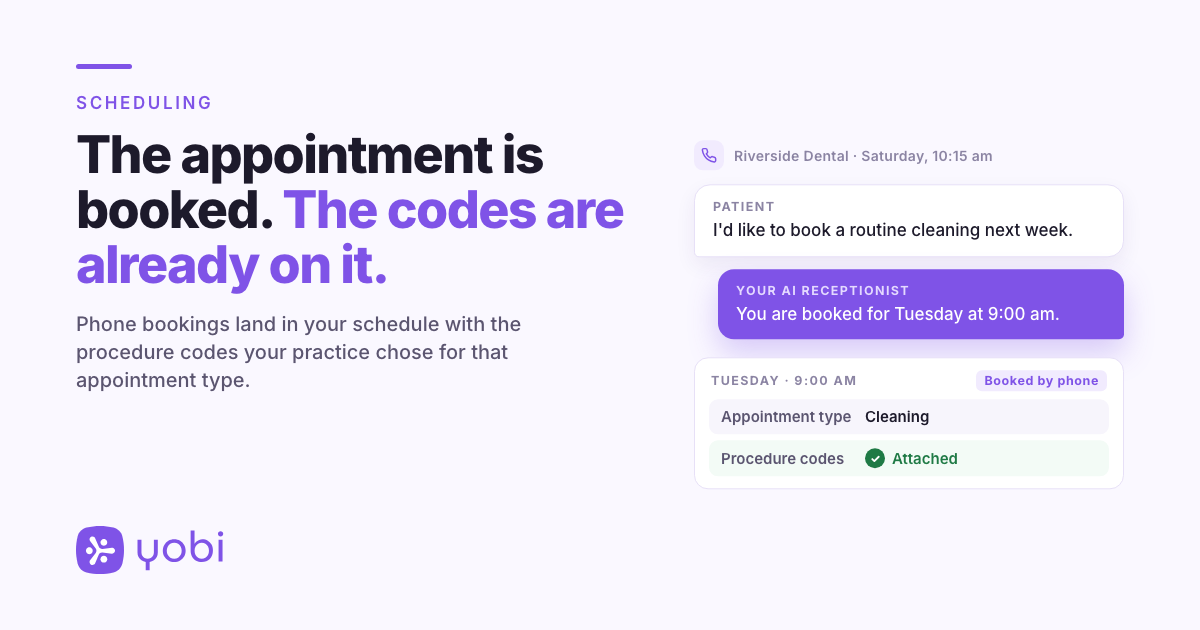
When Riverside Dental set up Dental Code Support, the practice chose the procedure codes for its cleaning appointment type. On Saturday morning, the office is closed, and a patient calls.
Agent: Thank you for calling Riverside Dental. How can I help?
Patient: Hi, I'd like to book a routine cleaning. Sometime next week, if you have it.
Agent: I would be glad to help. Can I get your name?
Patient: It's Alex.
Agent: Thanks, Alex. I have Tuesday at 9:00 am or Wednesday at 3:30 pm. Would either of those work?
Patient: Tuesday at 9 is great.
Agent: To make sure I have the right record, can you confirm your date of birth?
Patient: Sure. (Alex gives it.)
Agent: Thank you. You are booked for Tuesday at 9:00 am.
On Monday, the visit is in Riverside's schedule as a cleaning, with the codes Riverside chose for cleanings already attached.
Riverside Dental and Alex are fictional, used for illustration.
Why this matters for your practice
Before: a phone booking waits in the schedule for someone to attach its procedures. Until then, the day's numbers are missing a piece.
After: the booking arrives with the codes your practice chose for that appointment type, so your production and insurance estimates start from the procedures your practice books for that visit.
What to know before you set it up
- It works with Open Dental, Dentrix and Eaglesoft, for practices whose AI receptionist books into their schedule.
- The codes come from the appointment type, not from the call. Your practice chooses the codes for each type. Your AI receptionist books the type the caller asks for; it does not decide what treatment a patient needs. A caller who asks for a cleaning gets your cleaning type and the codes you chose for it.
- If your appointment types or codes change, let the Yobi team know.
Getting started
Dental Code Support is available now for Yobi customers whose AI receptionist books into Open Dental, Dentrix or Eaglesoft, at no additional cost.
If you are already a Yobi customer, send Yobi support a message from your Yobi inbox and the team will set it up. Request Dental Code Support
If you are not using Yobi yet, see how your AI receptionist handles a booking call. See It in a Demo or call Kate at 609-507-2178 to hear one.
FAQ
Do I need to set it up myself?
No. The Yobi team sets it up, using your existing appointment types and the codes you choose for them.
Who decides which codes go on each appointment type?
You do. The Yobi team sets up the codes your practice chooses for each appointment type.
Does it cost extra?
No. It is included at no additional cost for Yobi customers whose AI receptionist books into Open Dental, Dentrix or Eaglesoft.
Which practice management systems does it work with?
Open Dental, Dentrix and Eaglesoft.
Does the AI decide which procedures a patient needs?
No. It books the appointment type the caller asks for. The codes come from what your practice chose for that type.
What if a caller's request fits more than one appointment type?
Your AI receptionist asks the caller which one they need before it books.