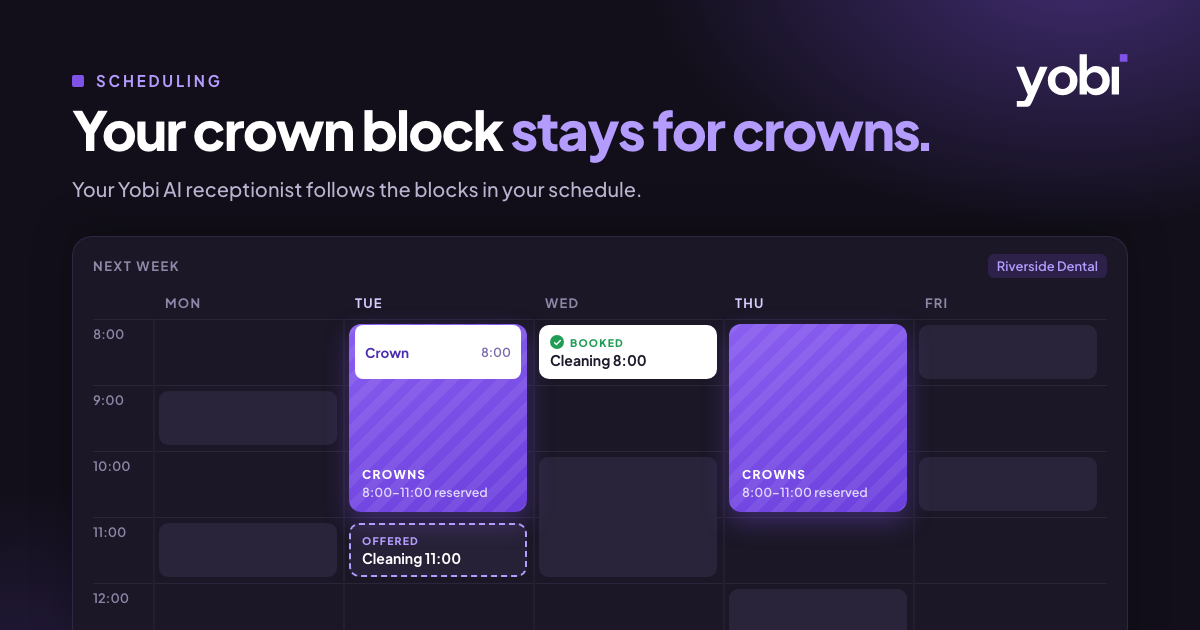
It is 7:40 pm on a Tuesday. Riverside Dental keeps Tuesday and Thursday mornings, 8:00 to 11:00, for crowns. A patient calls to book a cleaning: "First thing next Tuesday, if you have it."
On the calendar, 8:00 next Tuesday looks open. It is not open for a cleaning. It is the start of the crown morning, and if a cleaning goes in, the block your team planned around is broken before the day begins.
Why practices use dental block scheduling
Many practices plan the day in blocks: big restorative work in the morning, time held for new patients, room for emergencies. Dental practice-management advice is consistent on why. Blocks keep production steady from day to day, and they only work when whoever books keeps to them. DentistryIQ suggests color-coding openings by procedure in your practice management system, because it "prevents other staff from accidentally scheduling other procedures in the reserved time slots."
Your front desk knows the blocks. An AI receptionist answering at 7:40 pm sees open time, and the first open time may belong to something else.
A block schedule is only as good as the last booking made into it.
The fix: Block Scheduling
With Block Scheduling, your Yobi AI receptionist follows the blocks you keep in your practice management system, in both directions:
- A visit a block is reserved for can be booked into that block. A crown patient who calls is offered times in the crown morning.
- Other visits are offered times outside it. The cleaning caller hears times that do not run into the crown morning.
It applies whenever your AI receptionist offers or books a time: the first opening, a day the caller asks about, a booking for a new or existing patient, and a reschedule.
How it works
The Yobi team sets up Block Scheduling for your practice location.
- Keep your blocks where they are. Your blocks stay in your practice management system, connected to Yobi through NexHealth. If they are named blocks there, such as a block called "Crown", there is nothing to rebuild. The Yobi team checks this when it sets you up.
- Tell us which blocks are reserved, and for what. For example: "Tuesday and Thursday mornings are for crowns", or "the 2:00 block is for new-patient exams".
- The Yobi team sets it up. From then on, your AI receptionist books the visits each block is for into that block, and offers other visits times outside your blocks.
If you change your blocks later, for example add a new kind of block, move one to another day or change which visits it is for, message Yobi support so the team can update your setup.
Where it helps
1. The crown or restorative morning
Keep your longest, most productive appointments together. Routine visits are offered times outside the morning you reserved, so the morning is still there when a crown patient calls.
2. Time for new-patient exams
If you hold time each week for new-patient exams, new-patient exams can be booked into it and other visits are offered other times. If you also run a new-patient special, see how your AI receptionist keeps it for new patients in New-Patient-Only Appointments.
A Tuesday evening call, start to finish
Here is the call from the top of this post.
Agent: Good evening, Riverside Dental. What can I do for you?
Patient: Hi, I need to get my teeth cleaned. Do you have anything first thing next Tuesday?
Agent: Happy to help with that. May I have your name?
Patient: Jordan.
Agent: Thanks, Jordan. Next Tuesday, the earliest I have is 11:00 am. I also have Wednesday at 8:00 am. Would either of those work?
Patient: Wednesday at 8 is perfect.
Agent: Great. Before I book it, can you confirm your date of birth?
Patient: Sure. (Jordan gives it.)
Agent: Thank you, Jordan. You are booked for Wednesday at 8:00 am.
Jordan got an early appointment. The crown morning is still open, and when a crown patient calls the next day, the 8:00 Tuesday slot is there for them.
Riverside Dental and Jordan are fictional, used for illustration.
Why this matters for your practice
Before: your blocks hold when the person booking knows them. After hours, the first open time is the first time offered.
After: your AI receptionist follows your blocks on the calls it answers, including the ones at 7:40 pm.
What to know before you set it up
- It applies to phone calls your AI receptionist answers.
- It works for practices whose AI receptionist books into their practice management system through NexHealth.
- It follows your blocks; it does not change them. Your schedule stays as it is, and your team can still book any time in your system.
- In rare cases, a reserved time can still be offered to another kind of visit.
- Callers are not told a time is reserved. Your AI receptionist offers the times that fit their visit and does not explain the others.
Getting started
Block Scheduling is included in the AI Integrated plan, at no additional cost.
If you are already a Yobi customer, send Yobi support a message from your Yobi inbox with your blocks: which blocks are reserved, and which kinds of visits each one is for. Request Block Scheduling
If you are not using Yobi yet, see how your AI receptionist books around the schedule you already planned. See It in a Demo or call Kate at 609-507-2178 to hear a Yobi AI receptionist answer.
FAQ
Do I have to rebuild my blocks?
No, if they are named blocks in your practice management system, such as a block called "Crown". You tell the Yobi team which ones are reserved and for which visits, and the team checks your setup.
Can I set it up myself?
No. The Yobi team sets it up. Message Yobi support from your Yobi inbox with your blocks.
Does it cost extra?
No. It is included in the AI Integrated plan.
Which practice management systems does it work with?
Open Dental, Dentrix and Eaglesoft, when your practice is connected to Yobi through NexHealth and your blocks are set up as named blocks.
Is this the same as Recurring Blocked Times?
No. Recurring Blocked Times keep hours like your lunch break out of every appointment your AI receptionist offers. Block Scheduling reserves time for certain kinds of visits, so those visits can be booked into it and other visits are offered other times.